所有的類 Linux 系統都會提供一個名為 grep(global regular expression print,全域正則表達式輸出)的搜尋工具。grep 命令在對一個或多個檔案的內容進行基於模式的搜尋時非常有用。模式可以是單個字元、多個字元、單個單詞,或者是一個句子。
當命令匹配到執行命令時指定的模式時,grep 會將包含模式的一行輸出,但並不對原檔案內容進行修改。

在本文中,我們將討論 14 個 grep 命令的範例。
範例 1 在檔案中查找模式(單詞)
在 /etc/passwd 檔案中查找單詞「linuxtechi」
復制代碼代碼如下:
root@Linux-world:~# grep linuxtechi /etc/passwd
linuxtechi:x:1000:1000:linuxtechi,,,:/home/linuxtechi:/bin/bash
root@Linux-world:~#
範例 2 在多個檔案中查找模式。
復制代碼代碼如下:
root@Linux-world:~# grep linuxtechi /etc/passwd /etc/shadow /etc/gshadow
/etc/passwd:linuxtechi:x:1000:1000:linuxtechi,,,:/home/linuxtechi:/bin/bash
/etc/shadow:linuxtechi:$6$DdgXjxlM$4flz4JRvefvKp0DG6re:16550:0:99999:7:::/etc/gshadow:adm:*::syslog,linuxtechi
/etc/gshadow:cdrom:*::linuxtechi
/etc/gshadow:sudo:*::linuxtechi
/etc/gshadow:dip:*::linuxtechi
/etc/gshadow:plugdev:*::linuxtechi
/etc/gshadow:lpadmin:!::linuxtechi
/etc/gshadow:linuxtechi:!::
/etc/gshadow:sambashare:!::linuxtechi
root@Linux-world:~#
範例 3 使用 -l 參數列出包含指定模式的檔案的檔名。
復制代碼代碼如下:
root@Linux-world:~# grep -l linuxtechi /etc/passwd /etc/shadow /etc/fstab /etc/mtab
/etc/passwd
/etc/shadow
root@Linux-world:~#
範例 4 使用 -n 參數,在檔案中查找指定模式並顯示匹配行的行號
復制代碼代碼如下:
root@Linux-world:~# grep -n linuxtechi /etc/passwd
39:linuxtechi:x:1000:1000:linuxtechi,,,:/home/linuxtechi:/bin/bash
root@Linux-world:~#
root@Linux-world:~# grep -n root /etc/passwd /etc/shadow

範例 5 使用 -v 參數輸出不包含指定模式的行
輸出 /etc/passwd 檔案中所有不含單詞「linuxtechi」的行
復制代碼代碼如下:
root@Linux-world:~# grep -v linuxtechi /etc/passwd

範例 6 使用 ^ 符號輸出所有以某指定模式開頭的行
Bash 腳本將 ^ 符號視作特殊字元,用於指定一行或者一個單詞的開始。例如輸出 /etc/passes 檔案中所有以「root」開頭的行
復制代碼代碼如下:
root@Linux-world:~# grep ^root /etc/passwd
root:x:0:0:root:/root:/bin/bash
root@Linux-world:~#
範例 7 使用 $ 符號輸出所有以指定模式結尾的行。
輸出 /etc/passwd 檔案中所有以「bash」結尾的行。
復制代碼代碼如下:
root@Linux-world:~# grep bash$ /etc/passwd
root:x:0:0:root:/root:/bin/bash
linuxtechi:x:1000:1000:linuxtechi,,,:/home/linuxtechi:/bin/bash
root@Linux-world:~#
Bash 腳本將美元($)符號視作特殊字元,用於指定一行或者一個單詞的結尾。
範例 8 使用 -r 參數遞歸地查找特定模式
復制代碼代碼如下:
root@Linux-world:~# grep -r linuxtechi /etc/
/etc/subuid:linuxtechi:100000:65536
/etc/group:adm:x:4:syslog,linuxtechi
/etc/group:cdrom:x:24:linuxtechi
/etc/group:sudo:x:27:linuxtechi
/etc/group:dip:x:30:linuxtechi
/etc/group:plugdev:x:46:linuxtechi
/etc/group:lpadmin:x:115:linuxtechi
/etc/group:linuxtechi:x:1000:
/etc/group:sambashare:x:131:linuxtechi
/etc/passwd-:linuxtechi:x:1000:1000:linuxtechi,,,:/home/linuxtechi:/bin/bash
/etc/passwd:linuxtechi:x:1000:1000:linuxtechi,,,:/home/linuxtechi:/bin/bash
............................................................................
上面的命令將會遞歸地在 /etc 目錄中查找「linuxtechi」單詞
範例 9 使用 grep 查找檔案中所有的空行
復制代碼代碼如下:
root@Linux-world:~# grep ^$ /etc/shadow
root@Linux-world:~#
由於 /etc/shadow 檔案中沒有空行,所以沒有任何輸出
範例 10 使用 -i 參數查找模式
grep 命令的 -i 參數在查找時忽略字元的大小寫。
我們來看一個範例,在 paswd 檔案中查找「LinuxTechi」單詞。
復制代碼代碼如下:
nextstep4it@localhost:~$ grep -i LinuxTechi /etc/passwd
linuxtechi:x:1001:1001::/home/linuxtechi:/bin/bash
nextstep4it@localhost:~$
範例 11 使用 -e 參數查找多個模式
例如,我想在一條 grep 命令中查找「linuxtechi」和「root」單詞,使用 -e 參數,我們可以查找多個模式。
復制代碼代碼如下:
root@Linux-world:~# grep -e "linuxtechi" -e "root" /etc/passwd
root:x:0:0:root:/root:/bin/bash
linuxtechi:x:1000:1000:linuxtechi,,,:/home/linuxtechi:/bin/bash
root@Linux-world:~#
範例 12 使用 -f 用檔案指定待查找的模式
首先,在當前目錄中建立一個搜尋模式檔案「grep_pattern」,我想檔案中輸入的如下內容。
復制代碼代碼如下:
root@Linux-world:~# cat grep_pattern
^linuxtechi
root
false$
root@Linux-world:~#
現在,試試使用 grep_pattern 檔案進行搜尋
復制代碼代碼如下:
root@Linux-world:~# grep -f grep_pattern /etc/passwd 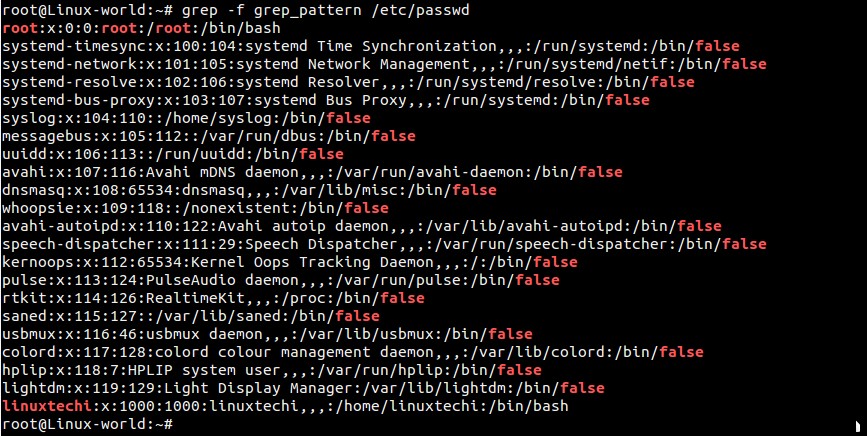
範例 13 使用 -c 參數計算模式匹配到的數量
繼續上面範例,我們在 grep 命令中使用 -c 命令計算匹配指定模式的數量
復制代碼代碼如下:
root@Linux-world:~# grep -c -f grep_pattern /etc/passwd
22
root@Linux-world:~#
範例 14 輸出匹配指定模式行的前或者後面 N 行
a)使用 -B 參數輸出匹配行的前 4 行
復制代碼代碼如下:
root@Linux-world:~# grep -B 4 "games" /etc/passwd
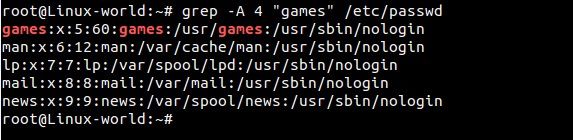
b)使用 -A 參數輸出匹配行的後 4 行
復制代碼代碼如下:
root@Linux-world:~# grep -A 4 "games" /etc/passwd

c)使用 -C 參數輸出匹配行的前後各 4 行
復制代碼代碼如下:
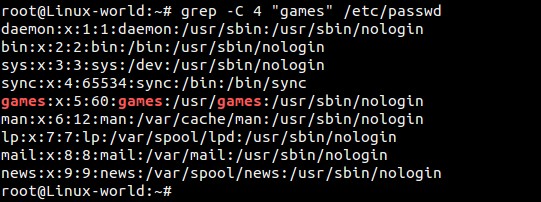
root@Linux-world:~# grep -C 4 "games" /etc/passwd