


身為開發者,如果現在還不知道 git 或還不會用 git,那你真該好好反省,去把入門介紹看一遍。今天只是整理自己在日常使用 git 時的一些常用命令,以及我認為不錯、能提升工作效率的用法。內容可能有點雜,但都是實用經典的命令,在此記下筆記,也希望能幫到路過的你。
區域
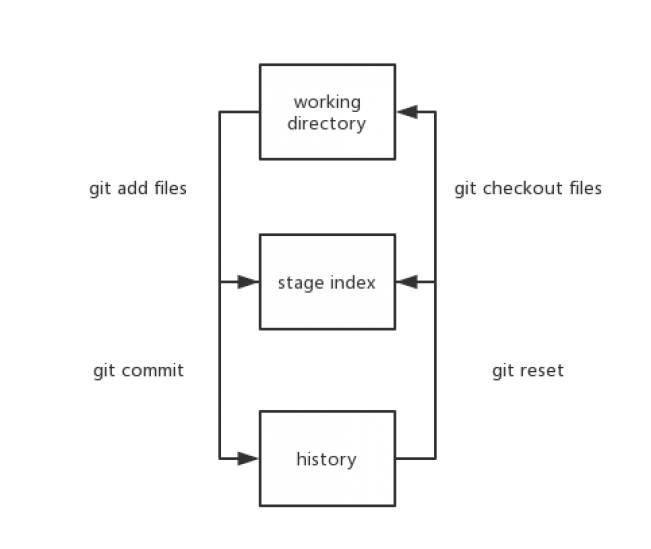
先來認識 git 的三個區域:
一張圖就能簡潔明瞭地說明它們之間的轉換。
clone
先從 clone 說起,用過 git 的都知道它。git clone 會把遠端倉庫拉取到本地。當我們想拉到指定資料夾時,你可能會先 mkdir,其實不必如此,一條命令就能搞定:git clone 遠端倉庫 檔名,就是這麼簡單。
rm
工作中可能遇到這樣的情況:用 git add . 把工作區所有修改都加入暫存區後,發現有個檔案暫時不想加進去,此時可用下面的命令把它退回工作區。
git rm --cached <file>
stash
有這麼一種情況:你正在開發中,突然有個線上的緊急 bug 要修,此時功能還沒完成、你不想提交,可以用 git stash 把工作區的檔案先存放起來。這樣就能放心切分支去修 bug,修完後執行 git stash pop 把先前存放的取回;相關命令還有 git stash list(查看存放記錄)與 git stash drop(丟棄存放記錄)。
tag
開發中可能要打標籤 git tag tagName,並把標籤推送到遠端倉庫,此時可用下面的命令推送。
git push --tags tagName
amend
當你 commit 後,發現有個檔案沒加進上次的 commit,或又改了一些檔案,此時你並不想新增 commit,只想併入上次的 commit,就可以用:
git commit --amend <file>
把暫存區的檔案併入其中,同時你也可以修改此時的 commit 訊息。
reset
reset 也能實現前面 rm 的效果,可用下面的命令替代 git rm --cached <file>:
git reset HEAD <file>
但 reset 用途更廣,搭配 soft 參數可回退到任意 commit 節點:
git reset --soft index
執行後就回到 index 處,工作區不變、暫存區回到當時的 index 處。另外還有 hard 參數:
git reset --hard index
它與 soft 可說對立,效果是把工作區與暫存區都清空。
rebase
rebase 是「重定向」的意思。若你目前的分支與遠端分支的 commit 存在差異,會提示你不能直接 push,必須先把遠端的 commit 拉到本地才能提交,這種情況就可以用 rebase。以下假設你目前在 develop 分支:
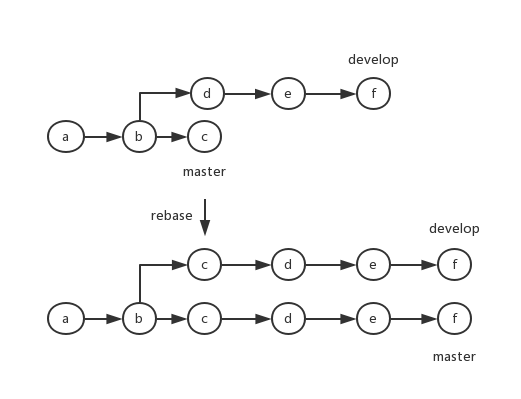
此時應先執行 rebase 命令:
git fetch git rebase origin/master
執行完後,最後再 push 到遠端 master:
git push origin master
最終各分支的情況就是上圖的效果。若覺得命令多難記,這裡也可用一條命令完成上面的效果:
git pull --rebase origin master
這是 rebase 的簡單運用,也是常見命令。下面介紹 rebase 的 --onto 可選參數。
--onto
使用場景:開發中我們都會建立不同分支開發不同功能。當你在分支 A 上建立了新分支 B 開發功能並提交了一些 commit 時,若發現 A 分支上有錯誤的 commit,rebase 到 master 時不想把這個錯誤的 commit 也帶上,這時就該 --onto 大顯身手了。
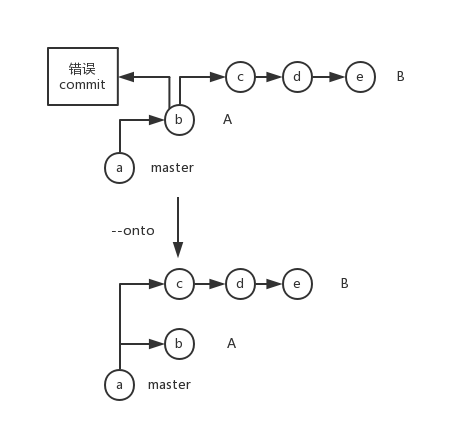
目前處在 B 分支,要得到上圖結果,只需執行:
git rebase --onto master <b的commit hash code> B
這不僅能作用於不同分支,也能作用於同一分支,因此針對上面的情況可只對分支 B 操作,等價命令如下:
git rebase --onto <a的commit hash code> <b的commit hash code> B
--interactive
當我們要修改 commit 訊息的名稱時,若要修改的 commit 在第一個,可用:
git commit --amend
若不是第一個,就要用到 rebase 的 --interactive 參數,可簡寫為 -i:
git rebase -i <commit hash code>
參數後面的 commit hash code 為需要修改的 commit 的前一個。執行後會出現類似下面的訊息:
pick 137cf0a First coommit pick 163dc38 Second commit # Rebase f9aee6e..163dc38 onto f9aee6e (2 command(s)) # # Commands: # p, pick = use commit # r, reword = use commit, but edit the commit message # e, edit = use commit, but stop for amending # s, squash = use commit, but meld into previous commit # f, fixup = like "squash", but discard this commit's log message # x, exec = run command (the rest of the line) using shell # # These lines can be re-ordered; they are executed from top to bottom. # # If you remove a line here THAT COMMIT WILL BE LOST. # # However, if you remove everything, the rebase will be aborted. # # Note that empty commits are commented out
依提示我們有 6 種可選操作。對於要修改 First commit 的情況,需要使用 r:
r 137cf0a First commit pick 163dc38 Second commit
執行後會跳到修改 First commit 的介面,進行修改即可。
First commit # Please enter the commit message for your changes. Lines starting # with '#' will be ignored, and an empty message aborts the commit. # # Date: Thu Jan 26 23:07:10 2017 +0800 # # rebase in progress; onto f9aee6e # You are currently editing a commit while rebasing branch 'master' on 'f9aee6e'. # # Changes to be committed: # new file: file1
其他操作項有興趣的可自行嘗試,例如 s 操作就能用來合併 commit。
branch
相信 branch 大家都很熟悉,這裡要說的是另一種可能用到的情況:建立新分支時,並不想從目前的 commit 節點建立。
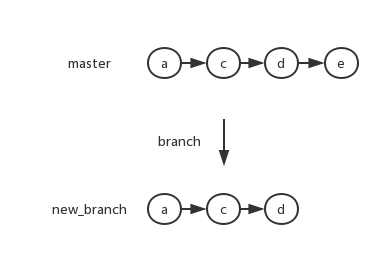
要實現上圖效果,只需在建立分支時加上額外參數,也就是你想切到的 commit 節點的 hash code:
git branch new_branch <commit hash code>
push
這裡提一下 push 的 --set-upstream,它的效果是設定上游分支。當我們把遠端不存在的本地分支推送到遠端時,若不在該分支上,一般會用下面的命令推送:
git checkout push_branch git push origin push_branch
更簡潔的方法是用該參數,無須切換分支,直接用:
git push --set-upstream origin push_branch
cherry-pick
這個命令的場景是:當你所在的分支沒用了、要刪除它,但其中某個 commit 你還想推送到遠端 master。
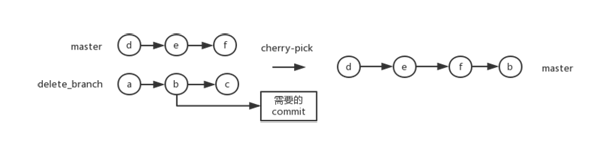
把分支切換到 master,執行:
git cherry-pick <b的 commit hash code>
merge
我們熟知用 merge 來合併分支,每次 merge 都會自動把副分支合併成一個 commit 推送到主分支。若你不想讓它自動推送(可能還想再修改),這時可用 --squash:
git merge --squash dev_branch
執行後,就能在暫存區看到一個尚未提交的檔案狀態。
reflog
切分支太頻繁後,可能會忘了一些分支是從哪個分支切出來的,此時可用:
git reflog
894a16d HEAD@{0}: commit: commit another todo 6876e5b HEAD@{1}: checkout: moving from solve_world_hunger to kill_the_batman 324336a HEAD@{2}: commit: commit todo 6876e5b HEAD@{3}: checkout: moving from blowup_sun_for_ransom to solve_world_hunger 6876e5b HEAD@{4}: checkout: moving from kill_the_batman to blowup_sun_for_ransom 6876e5b HEAD@{5}: checkout: moving from cure_common_cold to kill_the_batman 6876e5b HEAD@{6}: commit (initial): initial commit
這樣就能看到所有操作歷史了。若用 git reset 不小心刪掉了需要的東西,可透過此找出刪除操作的 hash code,再用下面的命令恢復:
git checkout <hash code>
目前想到的就這些,希望能有所幫助。
來源:https://mobile.51cto.com/android-530100.htm