


在 Red Hat Enterprise Linux Server release 5.7 上設定 YUM 本地源時,遇到 [Errno 5] OSError: [Errno 2] No such file or directory,花了一點時間才釐清來龍去脈,記錄如下。
把 5.7 的光碟鏡像複製到 /mnt/cdrom/LinuxSrc,並寫好 rhel-media.repo:
[root@DB-Server yum.repos.d]# more rhel-media.repo
[media]
name=Red Hat Enterprise Linux 5.7
baseurl=file:///mnt/cdrom/LinuxSrc
enabled=1
gpgcheck=0
gpgkey=file:///mnt/cdrom/LinuxSrc/RPM-GPG-KEY-redhat-release
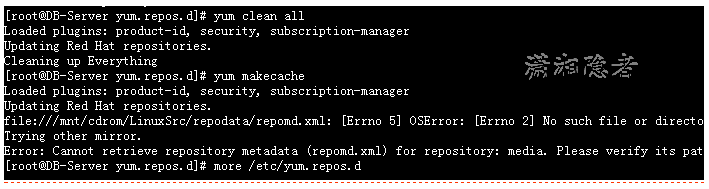
執行 yum clean all 之後再 yum makecache 就出錯:
[root@DB-Server yum.repos.d]# yum makecache
Loaded plugins: product-id, security, subscription-manager
Updating Red Hat repositories.
file:///mnt/cdrom/LinuxSrc/repodata/repomd.xml: [Errno 5] OSError:
[Errno 2] No such file or directory: '/mnt/cdrom/LinuxSrc/repodata/repomd.xml'
Trying other mirror.
Error: Cannot retrieve repository metadata (repomd.xml) for repository: media.
Please verify its path and try again
問題出在 RHEL 5.x 與 6.x 的 rpm 存放路徑不同:
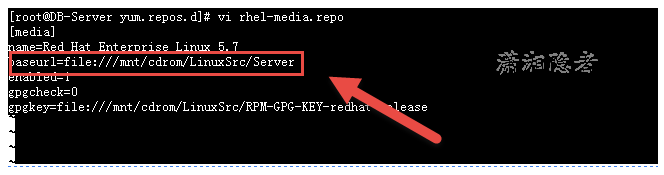
Server 子目錄(本例為 /mnt/cdrom/LinuxSrc/Server)。Packages 子目錄。所以 baseurl 少寫了 /Server,Yum 當然在該路徑下找不到 repodata。
[root@DB-Server yum.repos.d]# vi rhel-media.repo
[media]
name=Red Hat Enterprise Linux 5.7
baseurl=file:///mnt/cdrom/LinuxSrc/Server
enabled=1
gpgcheck=0
gpgkey=file:///mnt/cdrom/LinuxSrc/RPM-GPG-KEY-redhat-release
如果目錄結構無法更動,可以用 createrepo 自行產生中介資料:
[root@DB-Server Server]# rpm -ivh createrepo-0.4.11-3.el5.noarch.rpm
warning: createrepo-0.4.11-3.el5.noarch.rpm: Header V3 DSA signature: NOKEY, key ID 37017186
Preparing... ########################################### [100%]
   1:createrepo ########################################### [100%]

[root@DB-Server Server]# createrepo --update /mnt/cdrom/LinuxSrc
Previous repo file missing: /mnt/cdrom/LinuxSrc/repodata/primary.xml.gz
3388/3388 - VT/etherboot-roms-5.4.4-15.el5.x86_64.rpm
Saving Primary metadata
Saving file lists metadata
Saving other metadata

[root@DB-Server Server]# yum makecache
Loaded plugins: product-id, security, subscription-manager
Updating Red Hat repositories.
media | 951 B 00:00
media/filelists | 3.1 MB 00:00
media/other | 11 MB 00:00
media/primary | 1.1 MB 00:00
media 3388/3388
Metadata Cache Created
兩種做法可以視情況選用:路徑能改就用解法一,最乾淨;鏡像目錄結構不便更動、或需要自行組合自訂軟體庫時,解法二更靈活。