

#安裝cobbler apt-get install cobbler #在安裝debian系列時會用到的一個軟件包 apt-get install debmirror #安裝cobbler的web管理界面 apt-get install cobbler-web使用到的相關環境包tftpd-hpa、dhcp3-server會自動安裝。web界面可以通過http://10.1.6.234/cobbler_web查看,不過目前你還無法查看,因為相關用戶還沒有設置,為cobbler用戶重置密碼:
#回車後會讓你重置密碼
htdigest /etc/cobbler/users.digest "Cobbler" cobbler
# /etc/default/tftpd-hpa
TFTP_USERNAME="tftp"
TFTP_DIRECTORY="/var/lib/tftpboot"
TFTP_ADDRESS="0.0.0.0:69"
TFTP_OPTIONS="--secure"
通過/etc/init.d/tftpd-hpa 腳本管理
# Defaults for dhcp initscript
# sourced by /etc/init.d/dhcp
# installed at /etc/default/isc-dhcp-server by the maintainer scripts
# This is a POSIX shell fragment
# On what interfaces should the DHCP server (dhcpd) serve DHCP requests?
INTERFACES="eth0"
ddns-update-style none;
default-lease-time 600;
max-lease-time 7200;
log-facility local7;
subnet 10.1.6.0 netmask 255.255.255.0 {
  range 10.1.6.1 10.1.6.245;
  option routers 10.1.6.254;
  option broadcast-address 10.1.6.255;
  default-lease-time 600;
  max-lease-time 7200;
  next-server 10.1.6.234;
  filename  "pxelinux.0";
}
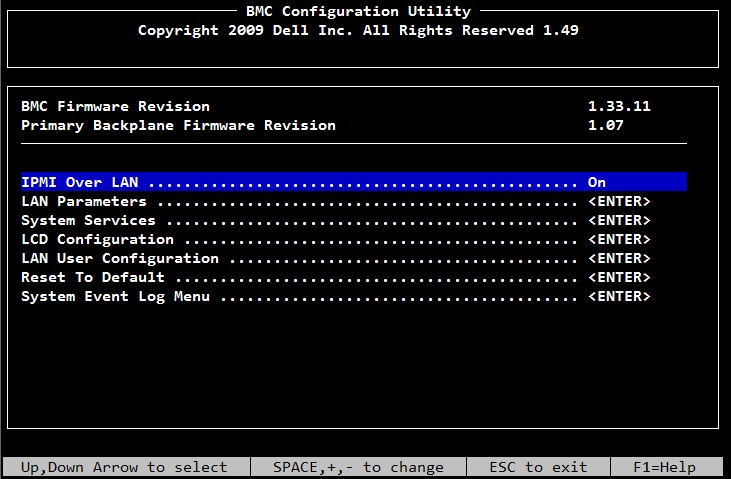
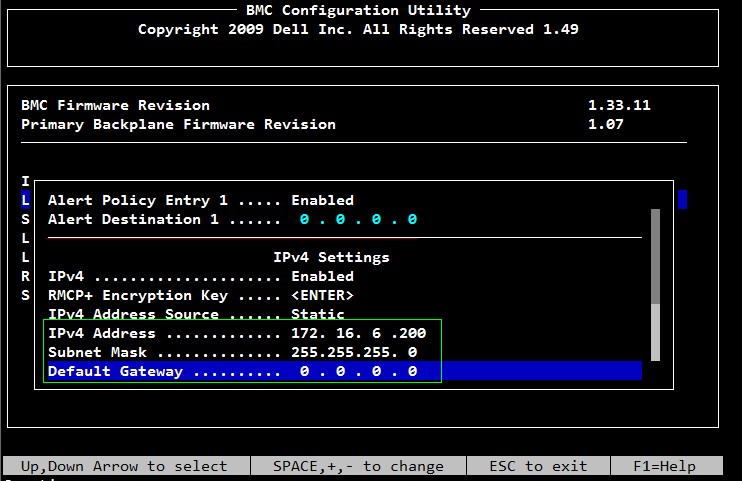
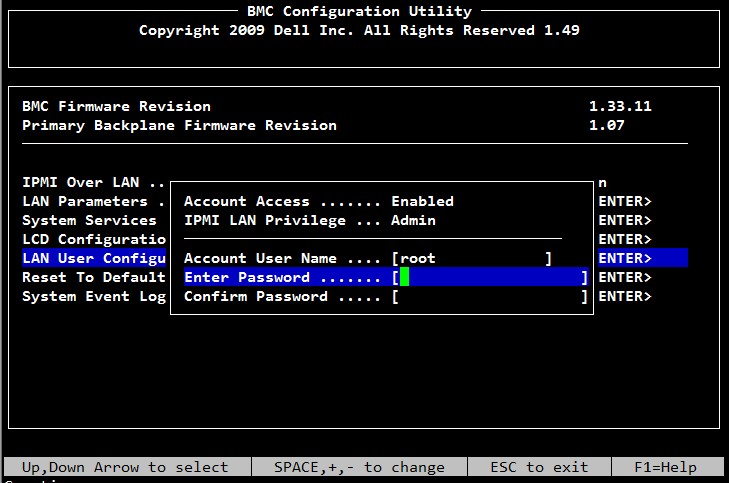
然後選擇LAN User Configuration,設置root密碼,然後保存退出。
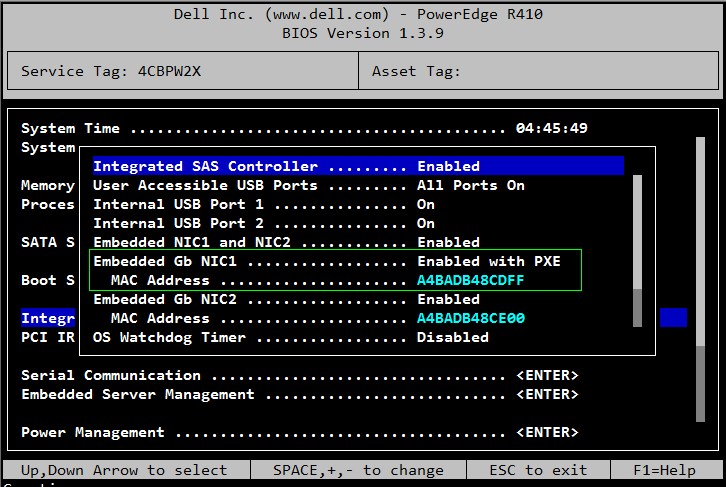
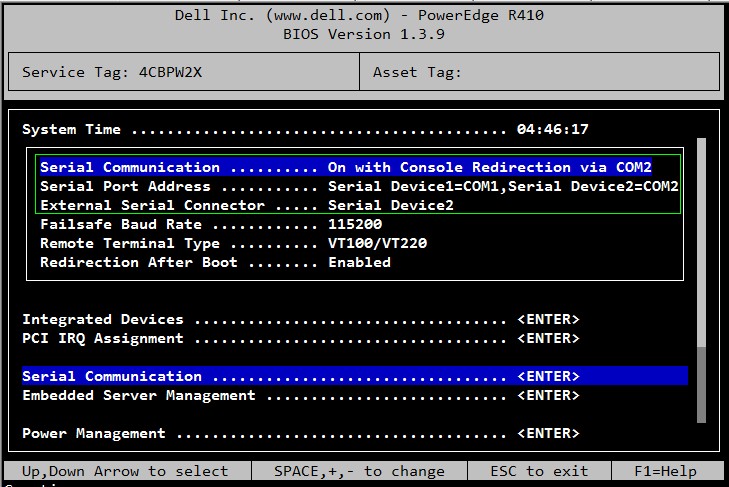
為了在遠程能抓到客戶端的啟動過程,還需要設置BIOS,開機按F2進入BIOS進行設置
選擇Integrated Devices,因為只有一塊網卡,所以設置從NIC1 啟動PXE
選擇Serial Communication,設置串口,然後保存退出。
3 初始化cobbler安裝環境
前面說了我實驗了四個發行版,成功兩個,失敗兩個,為了快速安裝都是導入相關iso作為安裝源的,所以第一步是准備相關iso發行版,我的如下:
/opt
├── CentOS-6.3-x86_64-bin-DVD1.iso
├── debian-6.0.2.1-amd64-CD-1.iso
├── ubuntu-12.04-server-amd64.iso
└── ubuntu-12.10-server-amd64.iso
mount -o loop ubuntu-12.04-server-amd64.iso /mnt
cobbler import --path=/mnt --name=ubuntu12.04
cobbler list
###顯示結果如下
distros:
   ubuntu12.04-x86_64
profiles:
   ubuntu12.04-x86_64
systems:
repos:
images:
mgmtclasses:
packages:
files:
cobbler distro edit --name=ubuntu12.04-x86_64 \
--kernel=/var/www/cobbler/ks_mirror/ubuntu12.04/install/netboot/ubuntu-installer/amd64/linux \
--initrd=/var/www/cobbler/ks_mirror/ubuntu12.04/install/netboot/ubuntu-installer/amd64/initrd.gz --arch=x86_64 \
--breed=ubuntu --os-version=precise
touch /var/lib/cobbler/kickstarts/ubuntu12.04.preseed
#######文件內容如下########
### Localization
d-i debian-installer/locale string en_US
d-i debian-installer/language string en
d-i debian-installer/country string US
d-i console-setup/ask_detect boolean false
d-i keyboard-configuration/layoutcode string us
d-i localechooser/supported-locales zh_CN.UTF-8

### Network configuration
d-i netcfg/enable boolean false
d-i netcfg/choose_interface select auto
d-i netcfg/disable_autoconfig boolean true
d-i netcfg/dhcp_failed note
d-i netcfg/dhcp_options select Do not configure the network at this time

### Mirror settings
d-i mirror/country string manual
d-i mirror/http/hostname string 10.1.6.234
d-i mirror/http/directory string /ubuntu12.04
d-i mirror/http/proxy string
d-i mirror/udeb/components multiselect main, restricted
#d-i mirror/http/mirror select mirrors.163.com
#d-i mirror/suite string quantal

### Clock and time zone setup
d-i clock-setup/utc boolean true
d-i clock-setup/ntp boolean true
d-i clock-setup/ntp-server string 10.1.1.2
d-i time/zone string Asia/Shanghai

### Partitioning
d-i partman-auto/disk string /dev/sda
d-i partman-auto/method string regular
d-i partman-lvm/device_remove_lvm boolean true
d-i partman-md/device_remove_md boolean true
d-i partman-lvm/confirm boolean true
#d-i partman-auto/choose_recipe select atomic
d-i partman-auto/expert_recipe string      \
    boot-root ::                           \
           50000  50000  50000  ext4       \
                 $primary{ }               \
	          $bootable{ }	       \
                 method{ format }          \
		  format{ }   	              \
                 use_filesystem{ }         \
	         filesystem{ ext4 }	       \
                 mountpoint{ / }	       \
	      .                             \
            8000  8000 8000 linux-swap     \
	         method{ swap }             \
		  format{ }                  \
	      .                             \
	    10000 1000 1000000 ext4         \
                  method{ format }         \
	          format{ }   		\
                  use_filesystem{ }        \
		  filesystem{ ext4 }   	\
                  mountpoint{ /opt }	\
	      .                             \
d-i partman/default_filesystem string ext4

d-i partman-partitioning/confirm_write_new_label boolean true
d-i partman/choose_partition select finish
d-i partman/confirm boolean true
d-i partman/confirm_nooverwrite boolean true
d-i partman/mount_style select uuid

### Base system installation
#d-i base-installer/install-recommends boolean true
#d-i base-installer/kernel/image     string linux-generic
d-i base-installer/kernel/image     string linux-server

### Account setup
d-i passwd/root-login boolean true
d-i passwd/root-password password 123456
d-i passwd/root-password-again password 123456
d-i user-setup/allow-password-weak boolean true
d-i user-setup/encrypt-home boolean false
d-i passwd/make-user boolean false

### Package selection
tasksel tasksel/first multiselect standard
d-i pkgsel/include string openssh-server
d-i pkgsel/upgrade select none
d-i pkgsel/language-packs multiselect de, en, zh
d-i pkgsel/update-policy select none
d-i pkgsel/updatedb boolean true

### Boot loader installation
d-i grub-installer/only_debian boolean true
d-i grub-installer/with_other_os boolean true

### Finishing up the installation
d-i finish-install/reboot_in_progress note
preseed解釋可見:https://help.ubuntu.com/12.04/installation-guide/example-preseed.txtcobbler profile edit --name=ubuntu12.04-x86_64 \ --kickstart=/var/lib/cobbler/kickstarts/ubuntu12.04.preseed
cobbler <distro|profile|system|repo|image|mgmtclass|package|file> ...
        [add|edit|copy|getks*|list|remove|rename|report] [options|--help]
cobbler <aclsetup|buildiso|import|list|replicate|report|reposync|sync|validateks|version> [options|--help]
cd /var/www
ln -s /var/www/cobbler/ks_mirror/ubuntu12.04 ubuntu12.04
DEFAULT menu
PROMPT 0
MENU TITLE Cobbler | http://fedorahosted.org/cobbler
TIMEOUT 200
TOTALTIMEOUT 6000
ONTIMEOUT local
LABEL local
    MENU LABEL (local)
    MENU DEFAULT
    LOCALBOOT -1
LABEL ubuntu12.04-x86_64
     kernel /images/ubuntu12.04-x86_64/linux
     MENU LABEL ubuntu12.04-x86_64
     append initrd=/images/ubuntu12.04-x86_64/initrd.gz  locale=  locale=en_US priority=critical text  auto url=http://10.1.6.234/cblr/svc/op/ks/profile/ubuntu12.04-x86_64 hostname=ubuntu12.04-x86-64 domain=local.lan suite=precise console=ttyS1,115200
     ipappend 2
MENU end
ifconfig eth0:1 172.16.6.252 netmask 255.255.255.0
####結果如下
eth0:1    Link encap:Ethernet  HWaddr 18:03:73:f0:a7:03
          inet addr:172.16.6.252  Bcast:172.16.6.255  Mask:255.255.255.0
          UP BROADCAST RUNNING MULTICAST  MTU:1500  Metric:1
          Interrupt:36 Memory:d6000000-d6012800
#####ping到客戶端ipmi地址,發現是通的
##1窗口,通過ipmi連接到客戶機
ipmitool -I lanplus -H 172.16.6.200 -U root -P 123456  sol activate
##2窗口,設置需哦那個pxe引導
ipmitool -I lanplus -H 172.16.6.200 -U root -P 123456  chassis bootdev pxe
##2窗口,設置重啟客戶機
ipmitool -I lanplus -H 172.16.6.200 -U root -P 123456  chassis power reset
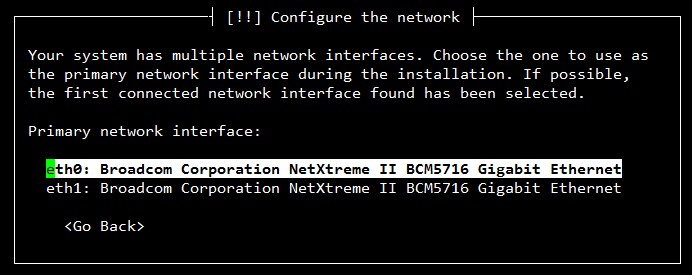
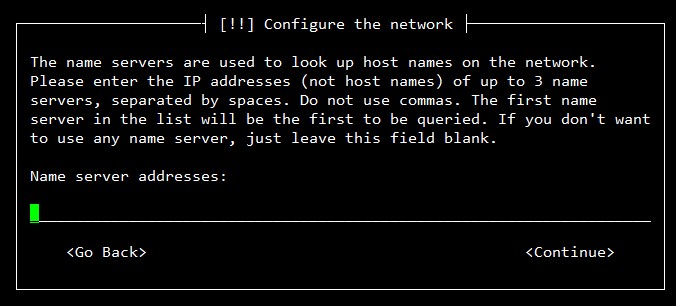
#platform=x86, AMD64, or Intel EM64T
# System authorization information
auth  --useshadow  --enablemd5
# System bootloader configuration
bootloader --location=mbr --driveorder=sda
# Partition clearing information
clearpart --all --initlabel
# Use text mode install
text
# Firewall configuration
firewall --disable
# Run the Setup Agent on first boot
firstboot --disable
# System keyboard
keyboard us
# System language
lang en_US
# Use network installation
#url --url=http://10.1.6.234/cblr/links/CentOS6.3-x86_64
url --url=$tree
# If any cobbler repo definitions were referenced in the kickstart profile, include them here.
#repo --name=source-1 --baseurl=http://10.1.6.234/cobbler/ks_mirror/CentOS6.3
$yum_repo_stanza
# Network information
#network --bootproto=dhcp --device=em1 --onboot=on
$SNIPPET('network_config')
# Reboot after installation
reboot
#Root password
rootpw 123456
# SELinux configuration
selinux --disabled
# Do not configure the X Window System
skipx
# System timezone
timezone  Asia/Shanghai
# Install OS instead of upgrade
install
# Clear the Master Boot Record
zerombr
# make partion
partition / --fstype="ext4" --asprimary   --size=50000
part swap  --size=8192
%pre
$SNIPPET('log_ks_pre')
$SNIPPET('kickstart_start')
$SNIPPET('pre_install_network_config')
# Enable installation monitoring
$SNIPPET('pre_anamon')
%packages
$SNIPPET('func_install_if_enabled')
$SNIPPET('puppet_install_if_enabled')
%post
$SNIPPET('log_ks_post')
# Start yum configuration
$yum_config_stanza
# End yum configuration
$SNIPPET('post_install_kernel_options')
$SNIPPET('post_install_network_config')
$SNIPPET('func_register_if_enabled')
$SNIPPET('puppet_register_if_enabled')
$SNIPPET('download_config_files')
$SNIPPET('koan_environment')
$SNIPPET('redhat_register')
$SNIPPET('cobbler_register')
# Enable post-install boot notification
$SNIPPET('post_anamon')
# Start final steps
$SNIPPET('kickstart_done')
# End final steps
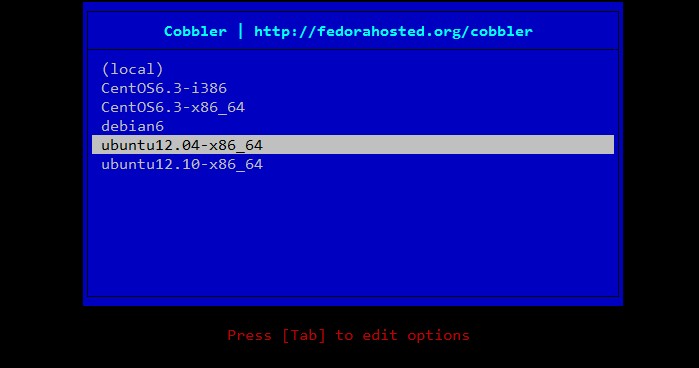
這次沒有出現ubuntu12.04需要手動干預的情況,IPMI從PXE啟動後,直接坐等客戶機系統安裝完成後重啟