


小技巧先送給你——備份MBR:dd if=/dev/sda of=/data/mbr.dump bs=512 count=1;恢復MBR:dd if=/data/mbr.dump of=/dev/sda bs=446 count=1。
Git是Linus開發的分散式版本控制系統,與Linux檔案系統結合得天衣無縫,在Windows下則需要 Cygwin 才能完美發揮。它的優秀案例就是 github.com,作為倉庫做實驗非常順手;開發者可以把線上倉庫git到本地,改動後再上傳也很方便;命令操作簡單,堪稱當前版本管理的潮流方向。
1、安裝並初始化倉庫
Centos:yum install -y epel-release ; yum install -y git
Ubuntu:sudo apt-get install git
windows:https://git-for-windows.github.io
mkdir /home/gitroot
cd /home/gitroot
git init   //初始化為git倉庫,生成.git目錄
2、提交文件到倉庫
echo -e "123\naaa\n456\nbbb" > 1.txt
git add 1.txt                        //把1.txt添加到倉庫
git status                          //查看本地庫狀態
git commit -m "add new file 1.txt"    //提交,-m添加描述
首次使用會提示設定身分:
git config --global user.email "你的郵箱"
git config --global user.name "要使用的名字"
echo -e "111111\n2222222222" >> 1.txt   //修改1.txt
git status                              //查看是否有改動
git diff 1.txt                          //對比本次修改內容
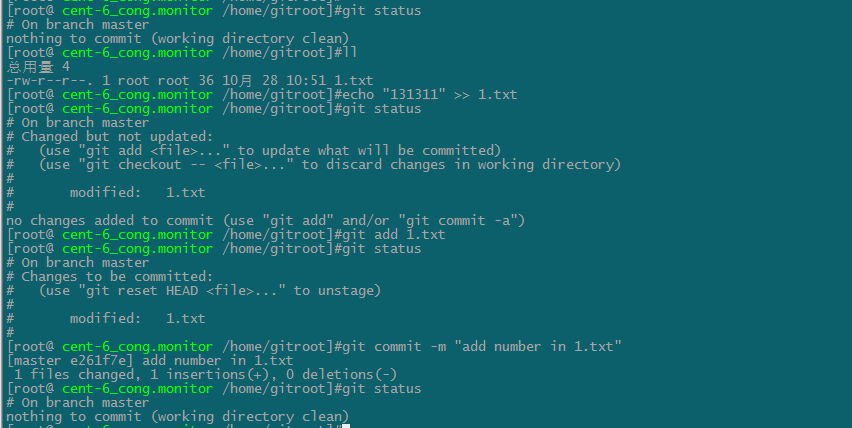
先多提交幾次以製造歷史版本,然後查看日誌:
git log                     //查看日誌
git reflog                  //顯示所有
git log --pretty=oneline    //逐行查看
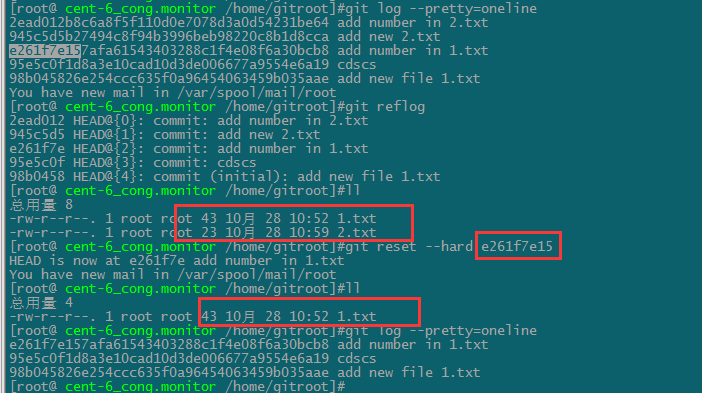
git reset --hard e261f7e15   //回退到指定版本(已commit後撤回)
git reset HEAD 1.txt         //add之後回退
git checkout -- 1.txt        //add之前回退(僅改動尚未add)
刪除倉庫中的文件:
echo "5555555555" >> 3.txt
git add 3.txt
git commit -m "add new file 3.txt"
rm -f 3.txt
git rm 3.txt
git commit -m "delect file 3.txt"
1、連接遠程倉庫
目前用得最多的是 https://github.com ,註冊帳號並建立倉庫。克隆時可選 http 或 ssh,http需要放行防火牆,一般更推薦ssh。使用ssh協議時要把客戶端公鑰貼到 GitHub:點右上角頭像 → settings → SSH and GPG keys → New SSH key。


把本地庫推送到遠程:
mkdir /home/test
cd /home/test
git init
git remote add origin https://github.com/Shanwn-git/test.git   //建立連接
echo "564646" > 1.txt
git add 1.txt
git commit -m "add 1.txt"
git push -u origin master    //首次推送,之後可直接 git push
error: 403 Forbidden —— 編輯 .git/config,把 url 換成ssh協議地址即可:
[remote "origin"]
url = git@github.com:Shanwn-git/test.git
fetch = +refs/heads/*:refs/remotes/origin/*
error: non-fast-forward updates were rejected —— 用 git push -f 強制覆蓋,或 git fetch && git merge(等同 git pull)先合併再推。
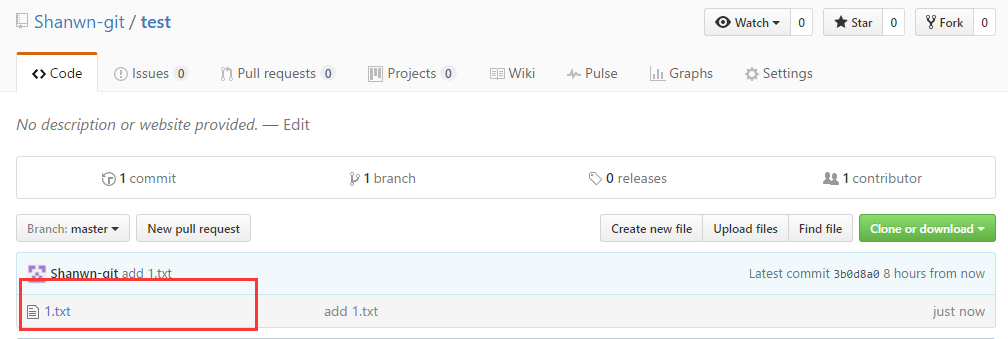
擴展:克隆他人倉庫後要上傳到自己倉庫時,注意 git:// 是只讀無法push,應改用 git@ 方式(需輸入密碼)。
2、分支管理
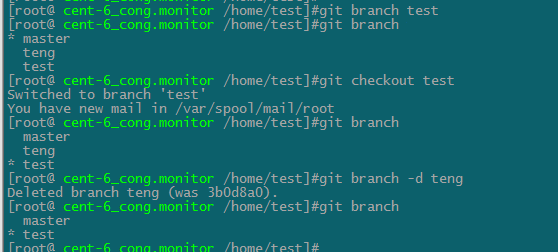
git branch teng          //創建分支
git branch               //查看分支
git checkout teng        //切換分支
git branch -d teng       //刪除分支(-D 強制刪除)
git merge test           //把test合並到master
若master與test同時改了同一文件,合併時會衝突,需先解決再合併。原則上master不直接操作,另建dev作開發,再在dev下給各開發者建bob分支。
git checkout dev
git merge bob
git remote -v                       //查看遠程庫信息
git ls-remote origin                //查看遠程分支
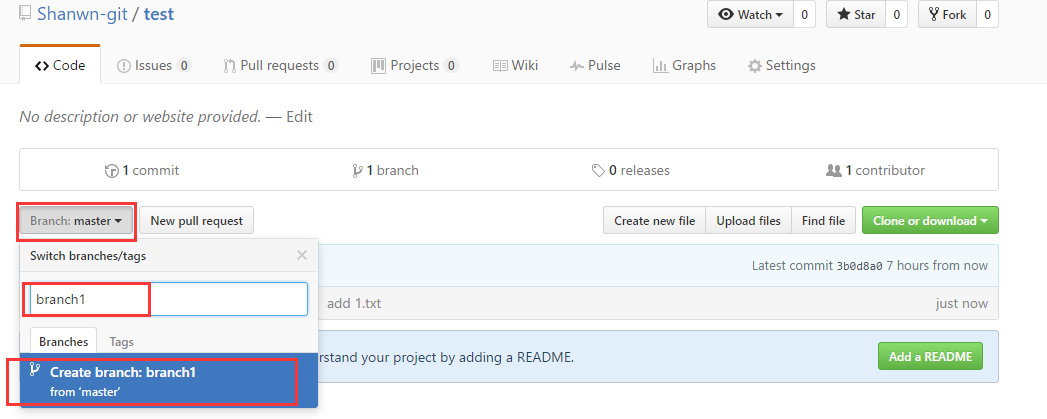
git checkout -b branch1 origin/branch1   //連接遠程分支
git pull                            //拉取遠程分支
3、標籤管理
標籤類似快照,可記錄版本狀態便於恢復:
git checkout master
git tag v1.0                          //打標簽
git show v1.0                         //查看標簽
git tag                               //列出標簽
git log --pretty=oneline --abbrev-commit
git tag v1.1 46dc8r1da                //針對歷史commit打tag
git tag -a v1.2 -m "this is a tag" 46dc8r1da   //帶描述
git tag -d v1.3                       //刪除標簽
git push origin v1.0                  //推送單個
git push --tag origin                 //推送所有
git push origin :refs/tags/v1.3       //刪除遠程標簽
4、git 別名
類似Linux的alias,可提高效率並寫入文件隨時拷貝:
git config --global alias.co checkout
git config --global alias.ci commit
git config --global alias.br branch
git config --global --unset alias br     //取消別名
git config --list | grep alias           //查看別名
5、保留現場
當你正做一半不想提交、又要臨時處理線上bug時,可用stash保留現場:
git stash                 //保留現場
git stash apply           //恢復現場
git stash list            //查看現場
git stash apply stash@{1} //指定恢復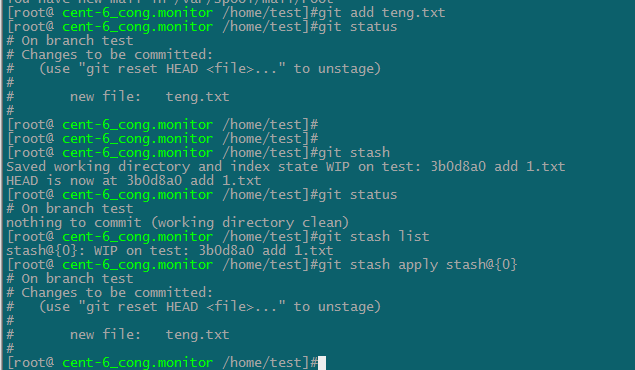
GitHub雖強大但倉庫公開,私有倉庫又需付費,可行的話不如自建公司私有倉庫。
服務端:
yum install -y git
useradd -s /usr/bin/git-shell git     //添加git用戶並禁止遠程登錄
cd /home/git
mkdir .ssh
touch .ssh/authorized_keys
chown -R git.git .ssh
chmod 600 .ssh/authorized_keys         //將客戶端公鑰放入
mkdir /data/git
cd /data/git
git init --bare sample.git             //創建裸倉庫,僅供共享
chown -R git.git sample.git
客戶端:先把公鑰拷貝到服務端keys文件,再克隆:
git clone git@ip:/data/git/sample.git
之後即可與服務端倉庫建立連接,開始上傳版本。
本文出自「北冰--Q」博客,請務必保留此出處 https://beibing.blog.51cto.com/10693373/1866579