


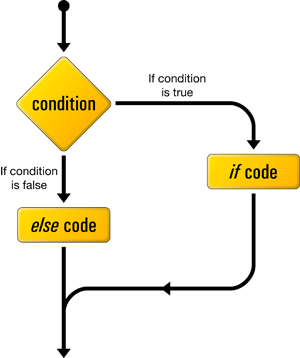
Bourne Shell 的 if 語句和大多數程式語言沒兩樣:先判斷條件是否成立,成立就執行 if 區塊內的指令,不成立就跳過整段,繼續往下跑。
if [ 判斷條件 ]
then
    command1
    command2
    ...
    last_command
fi
實際例子:
#!/bin/bash
number=150
if [ $number -eq 150 ]
then
    echo "Number is 150"
fi加上 else 之後,條件不成立時就有另一組指令可以接手。
if [ 判斷條件 ]
then
    command1
    ...
else
    command1
    ...
fi
#!/bin/bash
number=150
if [ $number -gt 250 ]
then
echo "Number is greater"
else
echo "Number is smaller"
fielif 是 else if 的縮寫,用來串接多重條件,不必把 if 一層層疊下去。
if [ 判斷條件1 ]
then
    command1
    ...
elif [ 判斷條件2 ]
then
    command1
    ...
else
    command1
    ...
fi
#!/bin/bash
number=150
if [ $number -gt 300 ]
then
echo "Number is greater"
elif [ $number -lt 300 ]
then
echo "Number is smaller"
else
echo "Number is equal to actual value"
fiif 與 else 可以在同一支腳本裡互相嵌套,關鍵字 fi 代表最內層 if 的收尾,有幾個 if 就得有幾個 fi,少一個都會出語法錯誤。
if [ 判斷條件1 ]
then
    command1
    ...
else
    if [ 判斷條件2 ]
    then
        command1
        ...
    else
        command1
        ...
    fi
fi
#!/bin/bash
number=150
if [ $number -eq 150 ]
then
echo "Number is 150"
else
if [ $number -gt 150 ]
then
echo "Number is greater"
else
echo "Number is smaller"
fi
fi寫作習慣上,巢狀超過兩層通常就該改用 elif 或 case 來重構,可讀性會好很多。另外別忘了 [ 與 ] 兩側都要留空格,這是新手最常踩的小坑。