


使用跳板機的目的:我們的服務器都是雲主機,使用的都是aws比較多,而且aws是以私鑰去連接公鑰,連接的方式都是以root權限連接,這樣子的話,開發人員要連接上服務器的話,不可能給root權限直接連吧,否則會對服務器造成很大的威脅.
跳板機實現的思路:使用shell去編寫,賬戶這塊使用LDAP做集中式管理+認證,權限這塊使用sudo集中式控制管理.
LDAP:部署可以使用yum,安裝簡單,不過安裝的目錄和結構都不同於一個位置.
也可以使用編譯安裝,編譯安裝的話,需要一定的時間,期間也會遇到很多錯誤,好處就是可以把編譯的環境統一管理在相同目錄中.
兩者安裝LDAP,遷移的時候,也非常容易.
(1)跳板機實現的過程:LDAP安裝+部署.我管理的LDAP是通過WEB管理工具來管理.
(2)編寫shell菜單
(3)創建普通用戶的私鑰+公鑰,並把公鑰上傳到對端的服務器的目錄底下.
實現的截圖:

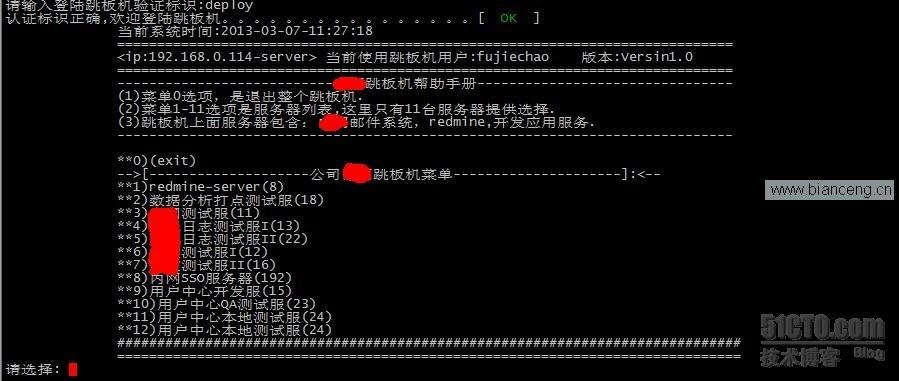

腳本如下:
[root@localhost jc]# cat tiaoban_deploy.sh

#!/bin/bash

ip=`/sbin/ifconfig eth0|grep "inet addr"|awk -F ":" '{print $2}'|awk '{print $1}'`

current_date=`date +%Y-%m-%d-%H:%M:%S`

dis_manumenu="<ip:${ip}-server>"


user=`echo $USER`

# Source function library.

. /etc/rc.d/init.d/functions


new_echo () {


if [ -z "$2" ]

then

    COLOR=33

elif [ $2 == red ]

then

    COLOR=31

elif [ $2 == green ]

then

    COLOR=32

elif [ $2 == blue ]

then

    COLOR=36

elif [ $2 == purple ]

then

    COLOR=35

elif [ $2 == white ]

then

    COLOR=39

else

    echo new_echo function use error

    exit

fi


if [ -z "$4" ]

then

    COLOR1=33

elif [ $4 == red ]

then

    COLOR1=31

elif [ $4 == green ]

then

    COLOR1=32

elif [ $4 == blue ]

then

    COLOR1=36

elif [ $4 == purple ]

then

    COLOR1=35

elif [ $4 == white ]

then

    COLOR1=39

else

    echo new_echo function use error

    exit


fi

if [ -z "$3" ]

then


    echo -en "\\033[1;${COLOR}m""\033[3m$1 \033[0m\n"

else

    echo -en "\\033[1;${COLOR}m""\033[3m$1 \033[0m\033[70G\\033[1;${COLOR1}m\033[3m $3 \033[0m\n"

fi

}


for signal in `seq 1 1000`

do

        trap ':' INT  EXIT TSTP TERM HUP $signal &> /dev/null

done


clear


for signal in `name`

do

        trap trap ':' INT  EXIT TSTP TERM HUP $signal &> /dev/null

done


clear


function getchar()

{

stty cbreak -echo

        dd if=/dev/tty bs=1 count=1 2>/dev/null

        stty -cbreak echo

}


###############################################################################

#while :

#do

name=`cat /opt/username`

        clear

        read -p "請輸入登陸跳板機驗證標識:" name


repa=`cat /opt/username`

         if [ "$name" ==  "$repa" ];then

             action "認證標識正確,歡迎登陸跳板機。。。。。。。。。。。。。。。。。。。" /bin/true


else

         action "對不起,您輸入的認證標識有錯誤,無法登陸跳板機,已退出............" /bin/false

         exit

         exit

fi

#        realuser=$(awk '{print $1}' $name)

#        realpass=$(awk '{print $1}' $pass)

#        if [ "$pass" == "$realpass" ]; then

#          echo "歡迎登陸跳板機。。。。。。。。。。。"

#else

#          echo "對不起,您的輸入有錯誤..............."

#fi

#done


cat <<EOF

              當前系統時間:$current_date

              =============================================================================

              $dis_manumenu 當前使用跳板機用戶:$USER    版本:Versin1.0

              =============================================================================

              ---------------------------跳板機幫助手冊--------------------------------

              (1)菜單0選項,是退出整個跳板機.

              (2)菜單1-11選項是服務器列表,這裡只有11台服務器提供選擇.

              (3)跳板機上面服務器包含:郵件系統,redmine,開發應用服務.

              -----------------------------------------------------------------------------


              **0)(exit)

              -->[--------------------公司跳板機菜單---------------------]:<--

              **1)redmine-server(8)

              **2)數據分析打點測試服(18)

              **3)測試服(11)

              **4)日志測試服I(13)

              **5)日志測試服II(22)

              **6)測試服I(12)

              **7)測試服II(16)

              **8)內網SSO服務器(192)

              **9)用戶中心開發服(15)

              **10)用戶中心QA測試服(23)

              **11)用戶中心本地測試服(24)

              **12)用戶中心本地測試服(24)

              ##############################################################################

              ==============================================================================

EOF


read -p "請選擇: " num


case $num in

0)

action "-------------------------exit----------------------------" /bin/true

exit


;;

1)

ip="192.168.3.8"

public=/home/$USER


if [ -z $CHECK ]

then

    clear

    new_echo "----------------------------------------------------------------------------------" green

    new_echo "Connection '$ip'($USER)          " purple "[ SUCCESS ]" green

    new_echo "`date +'%x %X'`                                         " white

    new_echo "--------------------------------- use ${SECONDS}s -----------------------------------------" green

    action 用戶:$user-"現在開始登陸,請稍等..............................." /bin/true

    ssh -i "/home/$USER/.ssh/id_rsa" $user@$ip

sleep 2


fi


;;

2)


ip="192.168.3.18"

public=/home/$USER

if [ -z $CHECK ]

then

    clear

new_echo "----------------------------------------------------------------------------------" green

new_echo "Connection '$ip'($USER)          " purple "[ SUCCESS ]" green

new_echo "`date +'%x %X'`                                         " white

new_echo "--------------------------------- use ${SECONDS}s -----------------------------------------" green

action 用戶:$user-"現在開始登陸,請稍等..............................." /bin/true

ssh -i "/home/$USER/.ssh/id_rsa" $user@$ip


fi

;;


3)


ip="192.168.3.11"

public=/home/$USER


if [ -z $CHECK ]

then

    clear

new_echo "----------------------------------------------------------------------------------" green

new_echo "Connection '$ip'($USER)          " purple "[ SUCCESS ]" green

new_echo "`date +'%x %X'`                                         " white

new_echo "--------------------------------- use ${SECONDS}s -----------------------------------------" green

action 用戶:$user-"現在開始登陸,請稍等..............................." /bin/true

ssh -i "/home/$USER/.ssh/id_rsa" $user@$ip

fi


;;

4)


ip="192.168.3.13"

public=/home/$USER


if [ -z $CHECK ]

then

    clear

new_echo "----------------------------------------------------------------------------------" green

new_echo "Connection '$ip'($USER)          " purple "[ SUCCESS ]" green

new_echo "`date +'%x %X'`                                         " white

new_echo "--------------------------------- use ${SECONDS}s -----------------------------------------" green

action 用戶:$user-"現在開始登陸,請稍等..............................." /bin/true

ssh -i "/home/$USER/.ssh/id_rsa" $user@$ip

fi


;;

5)


ip="192.168.3.22"

public=/home/$USER

if [ -z $CHECK ]

then

    clear

new_echo "----------------------------------------------------------------------------------" green

new_echo "Connection '$ip'($USER)          " purple "[ SUCCESS ]" green

new_echo "`date +'%x %X'`                                         " white

new_echo "--------------------------------- use ${SECONDS}s -----------------------------------------" green

action 用戶:$user-"現在開始登陸,請稍等..............................." /bin/true

ssh -i "/home/$USER/.ssh/id_rsa" $user@$ip

fi


;;

6)


ip="192.168.3.12"

public=/home/$USER


if [ -z $CHECK ]

then

    clear

new_echo "----------------------------------------------------------------------------------" green

new_echo "Connection '$ip'($USER)          " purple "[ SUCCESS ]" green

new_echo "`date +'%x %X'`                                         " white

new_echo "--------------------------------- use ${SECONDS}s -----------------------------------------" green

action 用戶:$user-"現在開始登陸,請稍等..............................." /bin/true

ssh -i "/home/$USER/.ssh/id_rsa" $user@$ip

fi


;;

7)


ip=192.168.3.16

public=/home/$USER


if [ -z $CHECK ]

then

    clear

new_echo "----------------------------------------------------------------------------------" green

new_echo "Connection '$ip'($USER)          " purple "[ SUCCESS ]" green

new_echo "`date +'%x %X'`                                         " white

new_echo "--------------------------------- use ${SECONDS}s -----------------------------------------" green

action 用戶:$user-"現在開始登陸,請稍等..............................." /bin/true

ssh -i "/home/$USER/.ssh/id_rsa" $user@$ip

fi


;;

8)


ip=192.168.3.92

public=/home/$USER


if [ -z $CHECK ]

then

    clear

new_echo "----------------------------------------------------------------------------------" green

new_echo "Connection '$ip'($USER)          " purple "[ SUCCESS ]" green

new_echo "`date +'%x %X'`                                         " white

new_echo "--------------------------------- use ${SECONDS}s -----------------------------------------" green

action 用戶:$user-"現在開始登陸,請稍等.............................." /bin/true

ssh -i "/home/$USER/.ssh/id_rsa" $user@$ip

fi

;;


9)


ip=192.168.3.15

public=/home/$USER


if [ -z $CHECK ]

then

    clear

new_echo "----------------------------------------------------------------------------------" green

new_echo "Connection '$ip'($USER)          " purple "[ SUCCESS ]" green

new_echo "`date +'%x %X'`                                         " white

new_echo "--------------------------------- use ${SECONDS}s -----------------------------------------" green

action 用戶:$user-"現在開始登陸,請稍等..............................." /bin/true

ssh -i "/home/$USER/.ssh/id_rsa" $user@$ip

fi


;;

10)


ip=192.168.3.23

public=/home/$USER


if [ -z $CHECK ]

then

    clear

new_echo "----------------------------------------------------------------------------------" green

new_echo "Connection '$ip'($USER)          " purple "[ SUCCESS ]" green

new_echo "`date +'%x %X'`                                         " white

new_echo "--------------------------------- use ${SECONDS}s -----------------------------------------" green

action 用戶:$user-"現在開始登陸,請稍等..............................." /bin/true

ssh -i "/home/$USER/.ssh/id_rsa" $user@$ip

fi


;;

11)


ip=192.168.3.24

public=/home/$USER


if [ -z $CHECK ]

then

    clear

new_echo "----------------------------------------------------------------------------------" green

new_echo "Connection '$ip'($USER)          " purple "[ SUCCESS ]" green

new_echo "`date +'%x %X'`                                         " white

new_echo "--------------------------------- use ${SECONDS}s -----------------------------------------" green

action 用戶:$user-"現在開始登陸,請稍等..............................." /bin/true

ssh -i "/home/$USER/.ssh/id_rsa" $user@$ip

fi


;;


12)


ip=192.168.3.25

public=/home/$USER


if [ -z $CHECK ]

then

    clear

new_echo "----------------------------------------------------------------------------------" green

new_echo "Connection '$ip'($USER)          " purple "[ SUCCESS ]" green

new_echo "`date +'%x %X'`                                         " white

new_echo "--------------------------------- use ${SECONDS}s -----------------------------------------" green

action 用戶:$user-"現在開始登陸,請稍等..............................." /bin/true

ssh -i "/home/$USER/.ssh/id_rsa" $user@$ip

fi

;;


*)

clear

action 賬戶:$USER-"您的輸入有誤,已退出,請重新登錄,謝謝................" /bin/true

exit


;;

esac
作者署名:51cto博客 IMySQL